
Updated 2 November 2026
Organise memos into collections
A collection is a project's home: the one place your team and your AI assistant both work from. Put a client's meeting notes, proposals and files in a collection and everyone who can open it sees the same list, the same board and the same rules for how things are filed. A memo can sit in several collections at once, so a decision can live in the client's collection and in your team handbook without being copied.
Each collection has its own people, views, properties and standing instructions. This page covers creating one and filing memos into it. For the rest, see Share a collection with your team, See a collection as a list, board, table, calendar or timeline and Give a collection standing instructions.
Create a collection
Start one from wherever you are:
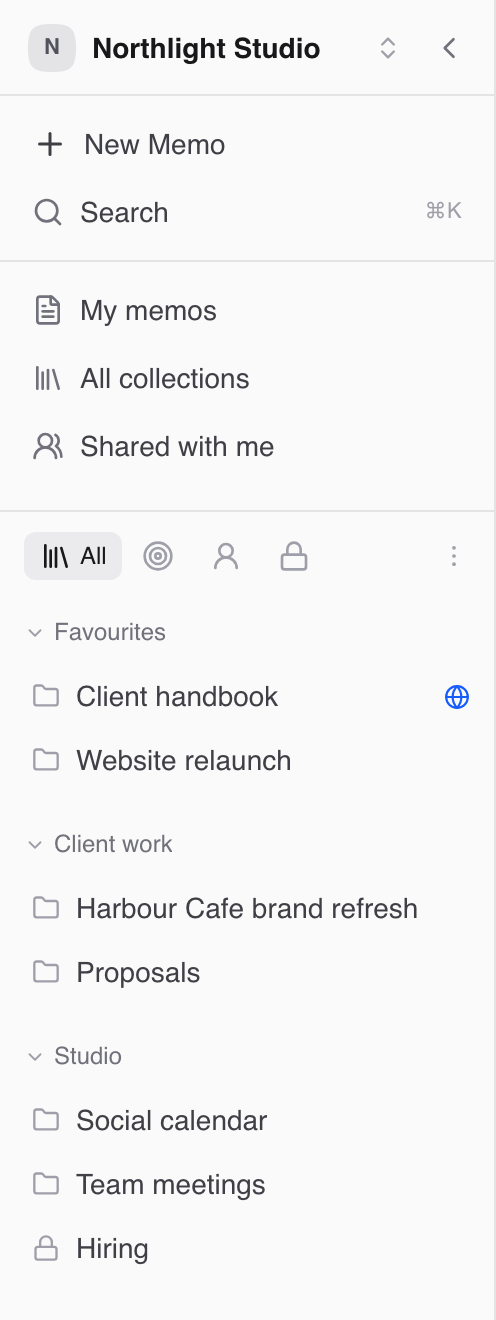
In the sidebar, while you're looking at your collections: hover the list's heading and click +, or open its ⋯ menu and choose New collection.
On the All collections page: click New collection.
From a memo: open + Add to collection, type a name such as "Acme rebrand" and choose Create "Acme rebrand". The memo goes straight into it, and you stay on the memo. Open collection in the message that appears takes you there.
From anywhere: press Cmd+K and choose New collection.
The New collection dialog asks for two things. Type a Name and press Enter or click Create. Share with everyone in your workspace is on by default; turn it off to keep the collection to yourself for now. If you already have a collection with that name, the dialog says so under the name, so pick another.
If you started from + on a tag's heading in the sidebar, the dialog shows the tag the new collection will get.
Fieldwerk then opens the new collection. A description and standing instructions are set from there: the empty collection offers Add a description and Write instructions, alongside New memo for its first memo.
Add a memo to a collection
Open the memo.
Click + Add to collection.
Pick a collection, or type a new name and choose Create to make one on the spot.
Repeat to add the memo to more collections. To file a new memo straight into a collection, use New memo from inside the collection instead.
If the collection is published, Fieldwerk asks Add to a published collection? first, because the memo may become visible to anyone with the collection's link.
File new memos somewhere by default
If most of your writing belongs in one place, stop filing by hand:
Open Personal settings (in your account menu, or from Cmd+K).
Under General, find Default collection and choose where New memos file here.
Choose None (leave memos unfiled) to stop filing them automatically.
Keep the important ones at the top
Pin a memo inside a collection with Pin on its row. Pinned memos stay at the top.
Favourite a collection with Add to favourites in the collection's menu. Favourites get their own section at the top of the sidebar.
Tag collections with Edit tags in the collection's menu, then use Group by tag in the sidebar or on All collections to group them.
Archive a collection
When a project ends, choose Archive from the collection's menu. It disappears from the sidebar and pickers, but nothing is deleted: its memos stay where they are. Archived collections sit under Archived at the bottom of All collections, where Unarchive brings one back.
Have your AI assistant do it
With a connected assistant (see Connect Claude to Fieldwerk or Connect ChatGPT to Fieldwerk), set up a project's home and its rules in one go:
In Fieldwerk, create a collection called "Acme rebrand" shared with everyone in my workspace, with these standing instructions: one memo per meeting, titled with the date and topic; set status to Draft until the notes are checked. Then file my memos from this week's Acme calls into it.Tidy up what's already there:
In Fieldwerk, list the memos in my Acme rebrand collection that have no owner set, and tell me which ones look like meeting notes.A good habit: write the collection's standing instructions the day you create it. Your assistant files things the way your team does from the first memo instead of guessing.