
Updated 2 November 2026
Comment on a memo and mention people
Select the words you want to talk about and click Comment. Your comment is pinned to that passage, so everyone can see exactly what it's about. Type @ to mention someone; they're notified, and you can assign the thread to them. This is how a review happens without a meeting: the question sits beside the sentence it's about, the right person is on the hook, and the thread closes when it's dealt with. Your AI can read and answer the same threads.
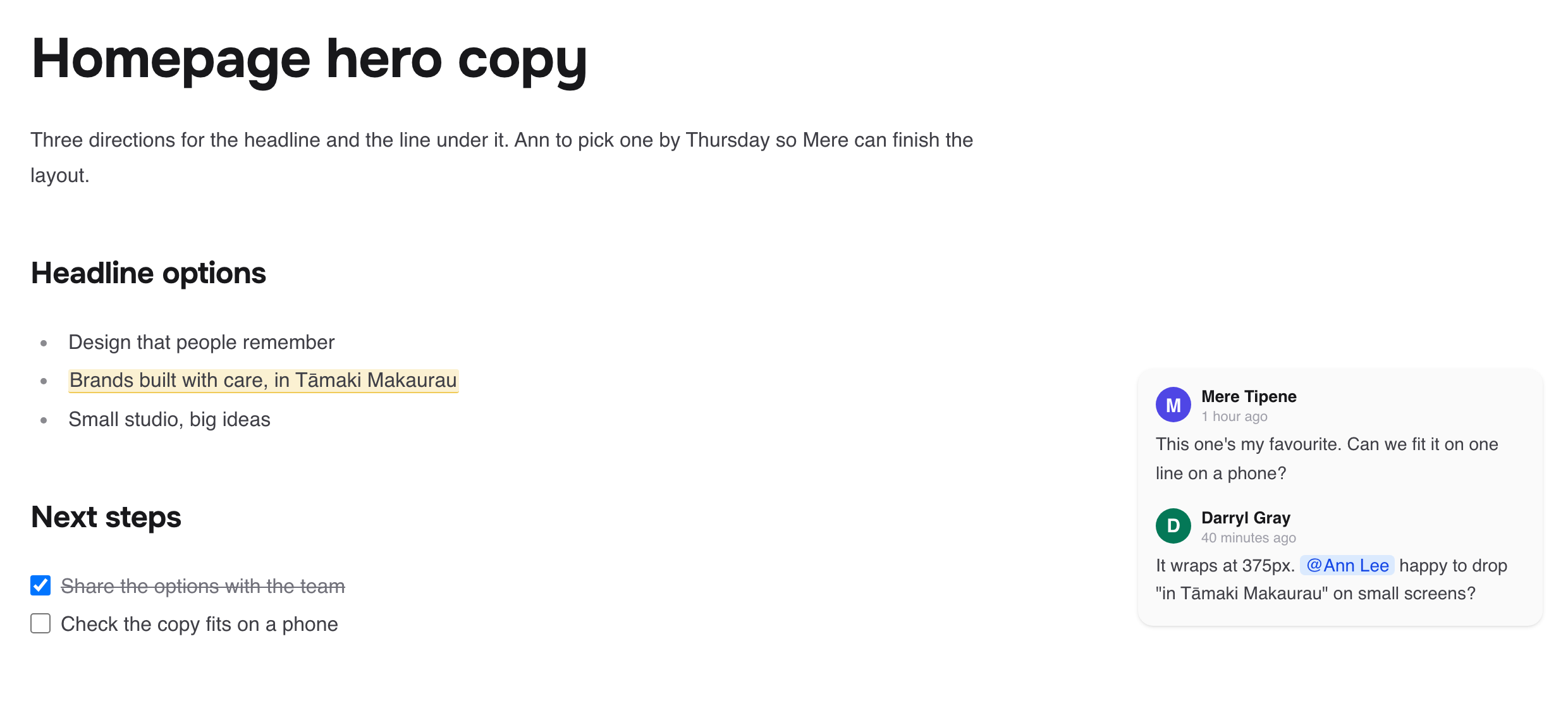
Start a comment
Select some text in the memo.
Click Comment in the toolbar, or press Cmd+Shift+M (Ctrl+Shift+M on Windows).
Type your comment in Leave a comment....
Press Cmd+Enter to send.
You can also comment on a whole block from its Block options menu.
To reply, type in Reply... under the thread.
Mention and assign someone
Type @ in a comment and pick a person.
Fieldwerk asks Assign this to {name}? Click Assign if they should act on it.
The thread then shows Assigned to {name}. Click Unassign to clear it, or use Assign to me from the comment's menu.
Assign a thread when you need someone to do something, and leave it unassigned when it's only a note. That keeps the assigned list meaningful.
Resolve a thread
Click Resolve on the thread when it's dealt with. Resolved threads are hidden but kept. Use the filter at the top of the comments (All types, Open, Resolved) to see them, and Reopen to bring one back.
Edit, delete or link to a comment
Open a comment's menu (Comment actions) to Edit, Copy link or Delete it. Deleting shows Undo for a moment in case you change your mind.
React to a comment with an emoji using Add reaction.
Have your AI do it
Once your AI is connected (see Connect Claude to Fieldwerk or Connect ChatGPT to Fieldwerk), it sees the same threads, anchored to the same passages, so you can hand it a review round:
In Fieldwerk, ask me which memo to work on. Read its open comments and list the change each one asks for. Make only the changes I agree to, reply on each of those threads saying what you did, and resolve the ones I say are done.Or have it start the conversation:
In Fieldwerk, start a comment thread on one of my memos. Ask me which memo, which passage, what to ask and who should answer. Show me the comment before you post it, then post it on that passage and assign the thread to them.Notifications
The bell in the sidebar (Notifications) shows mentions, assignments, replies, shares, access requests and other activity. Use Mark all as read, or switch between Show unread and Show all.
People in a thread, and the memo's owner, also get an email about new comments. Comments made close together are grouped into one email.
To stop comment emails for memos you own, open any memo's menu and choose Pause notifications. This applies to every memo you own. Resume notifications turns them back on. Every email also has an unsubscribe link.
Who can comment
People with Comment or Edit access can comment. Nobody can comment on a locked memo, and published collections never show comments.